How to build an SEO MCP server that earns its runtime
Build an SEO MCP server around one workflow, typed tools, the right transport, bounded errors, and a host-level smoke test. Includes a TypeScript skeleton and real test evidence.
Developers and growth engineers building a custom SEO MCP server for Claude Code, Cursor, or a custom agent
MCP / SEO MCP
Best Next Step
Inspect a working SEO MCP setup before you build your own
Use the hosted AgentSEO MCP endpoint when your agent needs search intelligence, or inspect the package and docs to compare its boundaries with the workflow you are designing.
Quick Brief
Best For
Developers and growth engineers building a custom SEO MCP server for Claude Code, Cursor, or a custom agent
Core Problem
Build an SEO MCP server around one workflow, typed tools, the right transport, bounded errors, and a host-level smoke test. Includes a TypeScript skeleton and real test evidence.
Read Shape
15 min read with scannable sections, proof blocks, and direct next actions.
Proof Inside
You’ll Cover
- Step one: name the workflow the server serves
- Step two: pick the tool shape
- Step three: write tight tool definitions
Most SEO MCP servers fail before the first tool call. The builder exposes every endpoint, sends raw provider payloads back to the model, then discovers too late that the agent cannot tell which job is expensive, asynchronous, or safe to retry.
The useful server starts with one decision. It gives the host a few well-bounded tools, returns evidence the model can act on, and proves the path through the same transport a user will run. This is the build guide for that version.
AgentSEO publishes this guide and operates an SEO MCP server. The implementation advice draws on the current official SDK documentation, our public package source, and a dated July 20, 2026 stdio smoke run. Those are different kinds of evidence, so I keep them separate below.
Step one: name the workflow the server serves
One workflow. One sentence. Write it down before you write any code.
The single biggest MCP mistake is building a server for no workflow in particular. That server ends up with too many tools, vague output, and no obvious boundary for retries or permissions.
Write one sentence that names the workflow. Example: A growth engineer in Claude Code wants to compare one target page with the US desktop SERP and leave with an approved refresh brief.
That sentence gives you an inclusion test. A tool belongs only when it helps the user complete that job. Keyword metrics, SERP evidence, and a refresh brief may belong. A generic browser, CMS publish action, and backlink crawler probably do not belong in the first release.
Step two: pick the tool shape
Thin wrapper or workflow router. Choose one, then name the tradeoff.
The two shapes that hold up are the thin wrapper and the workflow router. Pick one on purpose, then make the permission and error boundary visible.
| Shape | Tool style | Best for |
|---|---|---|
| Thin wrapper | One tool per SEO API endpoint | A technical team that already owns orchestration and needs explicit endpoint control |
| Workflow router | One tool per outcome the user wants | An agent host that needs fewer, decision-shaped calls |
Step three: write tight tool definitions
Name the job, validate the input, and state the decision the response supports.
The model reads tool definitions while deciding what to call. A tool description is part of the interface, not annotation after the fact. It should say what the tool does, when to use it, the important limit, and what a successful response contains.
There is no magic maximum number of tools or arguments. The practical boundary is whether a model can select the right tool from a real user request without guessing at hidden provider vocabulary. Split tools when the input contract or the downstream decision changes; keep them together when the same evidence answers the same question.
- Use a stable verb-and-noun name, such as inspect_serp or draft_refresh_brief.
- Use plain field names unless the provider-specific term is the actual user decision.
- Validate location, device, language, URL, and pagination inputs before an upstream request starts.
- Say when work is asynchronous, what the next polling step is, and whether a retry is safe.
- List the decision-ready fields in the response instead of promising a vague summary.
Start with three SEO tools, not a catalog
A small server makes it easier to test tool selection, token cost, errors, and downstream decisions.
For a page-refresh workflow, three tools are enough to learn whether the MCP boundary is earning its runtime. The first gets the search evidence. The second compares a known page with that evidence. The third turns an approved finding into a bounded brief. Add a fourth tool only when a real task shows a missing decision.
| Tool | Input | Useful output | Do not add yet |
|---|---|---|---|
| inspect_serp | keyword, country, device | ranking-page pattern, SERP features, dated result context | every raw result field from the provider |
| compare_page | target URL, keyword, SERP evidence ID | coverage gaps, conflicting intent, evidence to inspect | a generic content score with no explanation |
| draft_refresh_brief | approved comparison ID, audience, constraints | scope, source links, owner, and human review checklist | CMS publishing or mass page generation |
Build the current TypeScript server skeleton
Use a server factory, the current registerTool API, a real input schema, and a transport chosen for the caller.
The SDK changed quickly, so check the current official quickstart before copying an older import path. As of September 17, 2026, the current v2 documentation uses `@modelcontextprotocol/server`, Zod 4, a server factory, and separate transport helpers. The AgentSEO npm package still uses the v1 `@modelcontextprotocol/sdk` line. Both can work; do not mix their imports inside one server. Use v2 for a new build, or finish a deliberate migration with the official guide.
This compact v2 example shows the shape. It keeps the tool description specific, validates the keyword and location before the handler runs, returns both readable text and structured content, and writes no protocol-breaking logs to stdout.
Related reading
import { McpServer } from "@modelcontextprotocol/server";
import { serveStdio } from "@modelcontextprotocol/server/stdio";
import * as z from "zod/v4";

function createServer() {
  const server = new McpServer({
    name: "seo-workflow-server",
    version: "1.0.0",
  });

  server.registerTool(
    "inspect-serp",
    {
      description:
        "Inspect one Google results page for a keyword and location.",
      inputSchema: z.object({
        keyword: z.string().min(3),
        location: z.string().min(2).default("United States"),
      }),
    },
    async ({ keyword, location }) => {
      try {
        const result = await inspectSerp({ keyword, location });
        const output = {
          summary: "Inspected " + keyword + " in " + location + ".",
          evidence: result.topResults.slice(0, 5),
          next_action: "Compare one target page with these results.",
        };
        return {
          content: [{ type: "text", text: JSON.stringify(output) }],
          structuredContent: output,
        };
      } catch (error) {
        return {
          isError: true,
          content: [{
            type: "text",
            text: error instanceof Error ? error.message : "SERP inspection failed",
          }],
        };
      }
    },
  );

  return server;
}

await serveStdio(createServer);Choose the transport and auth boundary before you add tools
Local stdio and hosted HTTP solve different deployment problems. Treat the secret boundary as part of the design.
Use stdio when the MCP host launches a local child process. It is a clean first build because there is no remote server to operate, and the local environment can supply the upstream API key. Keep protocol messages on stdout; use stderr for logs and failures.
Use Streamable HTTP when multiple users or remote clients need one managed endpoint. Then the server owns authentication, authorization, rate limits, audit logs, and upstream credentials. The current MCP guidance recommends Streamable HTTP for remote servers and treats the older HTTP plus SSE path as backwards compatibility.
Do not create an auth tool that asks the model to handle credentials. Give the client a configured authentication path, expose only the permissions the workflow needs, and make write actions visibly separate from read-only research.
Related reading
| Choose | When it fits | Secret boundary | Tradeoff |
|---|---|---|---|
| Local stdio | Claude Code, a desktop host, or a repository-local workflow launches the process | The local host environment supplies the upstream key | Each user manages setup and updates |
| Hosted Streamable HTTP | A team, product, or remote agent needs one shared endpoint | The service validates callers and keeps upstream credentials server-side | You now own availability, auth, and rate limits |
Step four: return decision-shaped outputs
Summary, evidence, and a next action.
Every tool output should include a compact summary, evidence, and a suggested next action. This lets the model act without inventing a parsing layer. For long-running SEO work, add job state, the safe polling method, and the condition that makes the job terminal.
{
  "summary": "Local ranking dropped in 3 of 5 tracked cities this week.",
  "evidence": [
    { "city": "Austin", "position": 12, "previous": 7 },
    { "city": "Denver", "position": 9, "previous": 4 }
  ],
  "next_action": "Refresh the Austin and Denver landing pages with local reviews."
}
Step five: ship an eval set with the server
Ten prompts. Pass or fail. Rerun on every change.
An eval set is what keeps the server honest. Start with ten prompts a real user would type. Run them through the real transport. Log pass or fail per prompt, the selected tool, the returned error shape, and whether the answer led to the right next step.
Rerun the set on every tool, schema, or transport change. If a prompt breaks, investigate the tool and its description before weakening the eval.
Related reading
- Ten prompts is a healthy starting point.
- Prompts should cover happy paths, ambiguous requests, and common edge cases.
- Store expected outputs so pass and fail are objective.
- Include missing credentials, rejected parameters, an unavailable upstream, and asynchronous polling when those apply.
- Rerun on every deploy and whenever tool wording changes.
- Publish the method or a redacted result when it helps users assess the server; never publish customer queries or credentials.
Common mistakes when building an SEO MCP server
Four patterns that turn a small server into a maintenance mess.
These mistakes are easy to avoid if you name the decision boundary early.
- Exposing every API endpoint before proving one user workflow.
- Returning raw provider payloads without a summary, provenance, or next action.
- Hiding asynchronous work so a host cannot tell when to poll or stop.
- Treating a write-capable action as interchangeable with read-only research.
- Skipping the eval set until the first user complains.
- Changing tool names or meanings without a version and migration note.
A real MCP smoke test: 12 passes, 0 failures, 1 warning
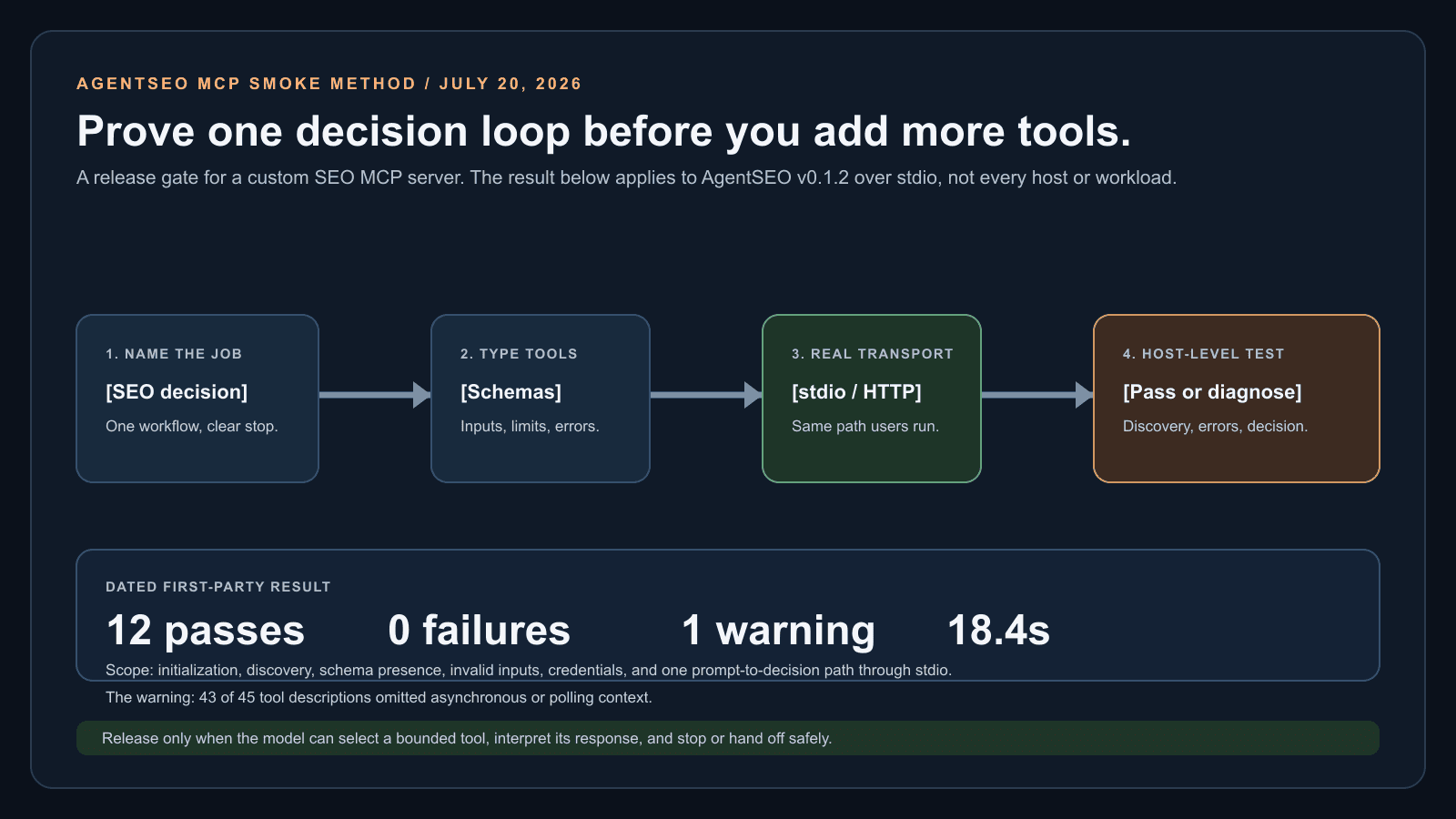
AgentSEO tested the server through stdio the way Claude Code invokes it, including failure paths and one real prompt-to-decision loop.
On July 20, 2026, we smoke-tested AgentSEO MCP server version 0.1.2 over stdio using protocol 2024-11-05. The run covered initialization, tools/list, schema presence, invalid parameters, unknown tools, bad credentials, missing credentials, and a real prompt-to-decision path.
The useful result was not the pass count. The run exposed one design warning: 43 of 45 tool descriptions did not tell the model that the underlying work could be asynchronous. The agent completed the task in 18.4 seconds with one extra call, but the missing async cue made polling behavior less predictable. That is the kind of failure a handler-only unit test will not reveal.
The test did not measure every host, production load, customer data quality, or model's planning ability. It did give us a practical release gate: test initialization, discovery, invalid arguments, credentials, and one complete user decision through the transport people actually use.
Related reading
| Check | Result | Evidence |
|---|---|---|
| Initialize and protocol handshake | Pass | Protocol 2024-11-05 |
| tools/list | Pass | 45 registered tools returned |
| Tool schemas | Pass | Every tool had a description and input schema |
| Invalid parameters and unknown tool | Pass | Model-readable errors and rejection |
| Bad or missing API key | Pass | Clear error and fail-fast behavior |
| Real prompt to decision | Pass | 18.4 seconds, one extra call |
| Async cues in descriptions | Warning | 43 of 45 descriptions omitted polling context |
Keep the workflow moving
Inspect a working SEO MCP setup before you build your own
Use the hosted AgentSEO MCP endpoint when your agent needs search intelligence, or inspect the package and docs to compare its boundaries with the workflow you are designing.

Daniel Martin
Cofounder, AgentSEO
Inc. 5000 Honoree and cofounder of AgentSEO and Joy Technologies. Daniel has helped 600+ B2B companies grow through search and now writes about practical SEO infrastructure for AI agents, MCP workflows, and REST-first execution systems.
FAQ
Questions teams usually ask next
How long does it take to build an SEO MCP server?
A minimal server can be small, but a responsible estimate depends on authentication, upstream APIs, transport, error handling, and evaluation depth. Scope one workflow and one tool first, then estimate production work after the end-to-end smoke test exposes the real integration cost.
What language should I use?
TypeScript or Python are both practical choices with official SDKs. Use the language that lets your team own schemas, upstream clients, tests, and deployment. For a new TypeScript server, follow the current v2 SDK docs; if you maintain a v1 package, plan that migration deliberately rather than mixing imports.
Should I build an MCP server or call the SEO API directly?
Use REST or an SDK when your backend owns the workflow and needs explicit endpoint control. Add MCP when a host such as Claude Code, Codex, Cursor, or your own agent should discover and call a bounded workflow interactively. Many production systems use both: REST for durable execution and MCP for the operator-facing tool layer.
Should I start with stdio or hosted HTTP?
Start with stdio when the intended host launches the process locally and one operator can manage the setup. Choose hosted Streamable HTTP when you need a managed shared endpoint for remote clients. The switch adds operational work: caller authentication, authorization, rate limiting, availability, and auditability.
Do I need to ship an eval set?
Yes. Without an eval set the server drifts every time a tool changes. Users notice fast.
Should I expose an auth tool?
No. Let the client handle auth. Auth tools make the model burn tokens on flows the user cannot approve.
More in this topic
Agentic SEO workflows and automation
Workflow
SEO agent guide: how to build one without breaking production
Build an SEO agent with a bounded job, typed workflow state, validation, retry limits, and a human gate before it changes production.
Platform
Best SEO APIs in 2026: what developers should use for data, SERPs, and automation
Compare leading SEO APIs by data coverage, SERP controls, async handling, pricing model, workflow fit, and the engineering work left to build.