AI Overview traffic drop: diagnose the cause before you change the page
Diagnose an AI Overview traffic drop with Search Console comparisons, live SERP evidence, indexing checks, and a page-level decision rule. Do not mistake a correlation for the cause.
SEO leads and marketers watching traffic drop on informational queries and unsure whether AI Overviews are the cause
AI Overviews / traffic drop
A click drop with a stable rank is not proof that an AI Overview took the click. It is a useful lead. The same pattern can also come from a weaker snippet, a competing feature, changing demand, an indexing problem, reporting noise, or a page that no longer answers the query as well as it used to.
The job is not to blame the interface. The job is to preserve enough evidence that a working team can say what changed, what did not, and whether the next move is to protect, refresh, reallocate, or wait.
Best Next Step
Turn an AI Overview suspicion into a reviewable diagnosis
Use AgentSEO to inspect a current query's AI Overview presence and candidate source set, then pair it with your own Search Console evidence before you change a page.
Start by disproving the AI Overview theory
The familiar click-and-impression pattern is a lead, not a verdict.
A matched-period pattern of impressions roughly holding, average position roughly holding, and clicks or CTR falling is worth investigating. It says the page may still be eligible and visible, but fewer searchers choose it. An AI Overview can be one explanation. So can a new feature, a more useful competitor snippet, a different result layout, changing query intent, or a data issue.
Google's own traffic-drop guidance starts broader: scope the loss by page, query, country, device, and search appearance; inspect indexing; compare a like-for-like period; and check for known data anomalies. Do that work before you change copy or declare that a feature caused the loss.
Our first-party baseline: this article has discovery, not a measured loss event
The current GSC export tells us what this page is being surfaced for. It does not tell us that the page lost traffic to AI Overviews.
The attached Search Console export is filtered to this URL, Web search, and the last 28 days. It reports 46 impressions, zero clicks, 0% CTR, and an average position of 28.65. The visible query rows include an alert-oriented question, AI Overview impressions, and traffic-loss diagnosis terms.
Those visible query rows account for fewer impressions than the page total. That is normal for small exports: query tables can omit or aggregate rows. Treat the page total as the page baseline and the query list as directional language evidence, not a complete query inventory.
Most importantly, this is one 28-day window. There is no matched pre-drop period in the supplied export, so it cannot prove the page itself experienced an AI Overview traffic loss. That limitation belongs next to the numbers, not in the footnotes.
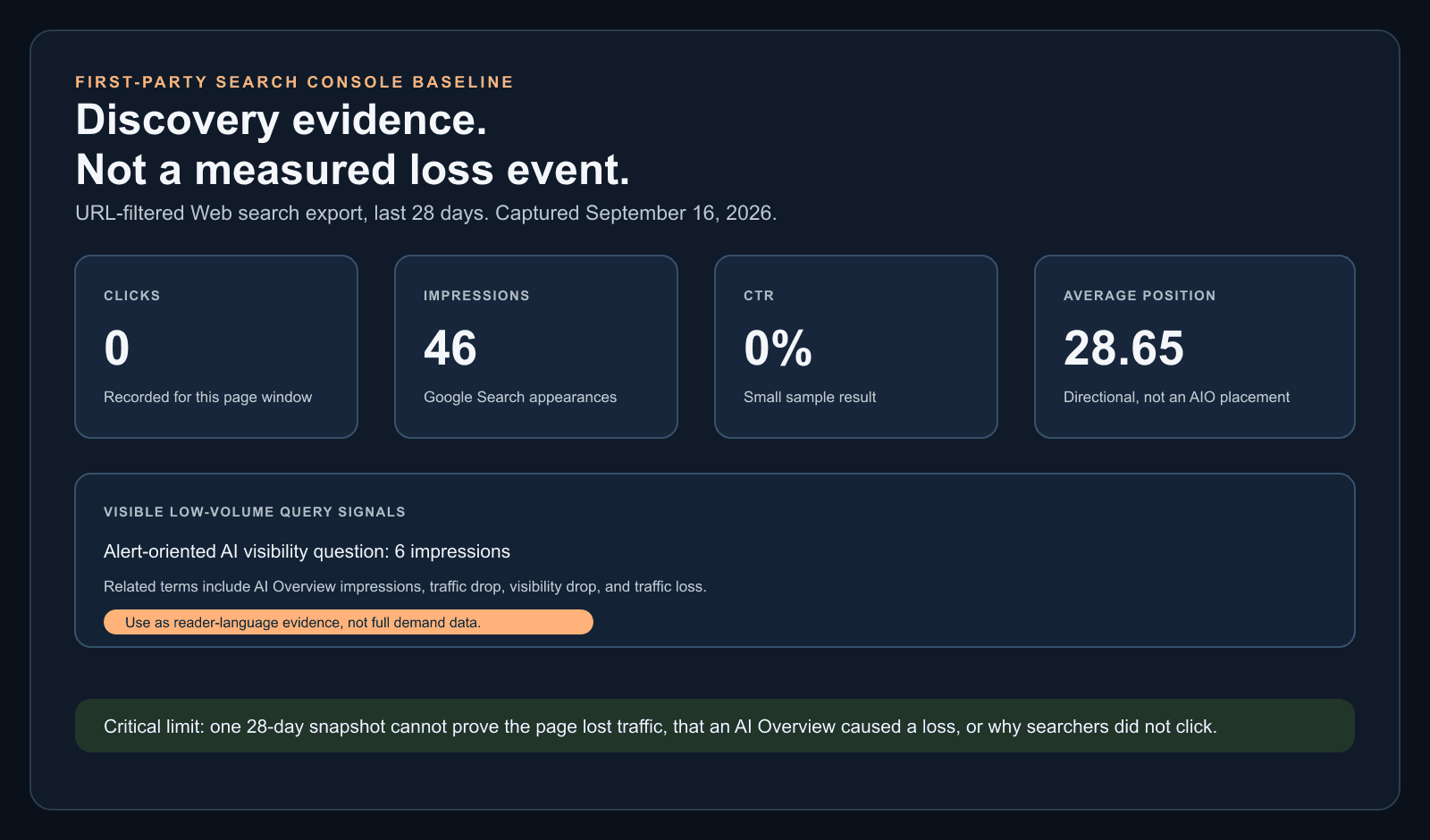
| Metric | Observed value | What it can support | What it cannot support |
|---|---|---|---|
| Clicks | 0 | No recorded click in this 28-day page-filtered window | A conclusion about the page's historical traffic loss |
| Impressions | 46 | The page appeared in Google Search during the window | A count of all user queries or a citation count |
| CTR | 0% | The current click-through result for this small page window | Why searchers did not click |
| Average position | 28.65 | A directional view of the page's observed result positions | A claim about a specific AI Overview placement |
Current US SERPs make AI Overview exposure worth testing, not assuming
Three relevant queries all showed an AI Overview in one dated US desktop sample, while the organic intent split between data stories and diagnostic runbooks.
On September 16, 2026, we ran US English desktop Google Organic Live checks for ai overview traffic drop, how to diagnose an ai visibility drop, and ai overview traffic loss through DataForSEO. All three returned an AI Overview and People Also Ask; the diagnosis query also returned a video carousel.
The traffic-loss terms favored research, news, and recovery guides from Search Engine Land, Ahrefs, Semrush, Forbes, and publishers. The diagnosis query favored incident-style playbooks and prompt-history workflows. The reader needs both: a way to reject weak attribution and a way to decide what to do once the evidence holds.
This sample does not show what any past SERP looked like, whether a user's personalized result matches it, or whether an AI Overview caused a historical click change. It is a current exposure check that tells an operator which query set deserves closer monitoring.
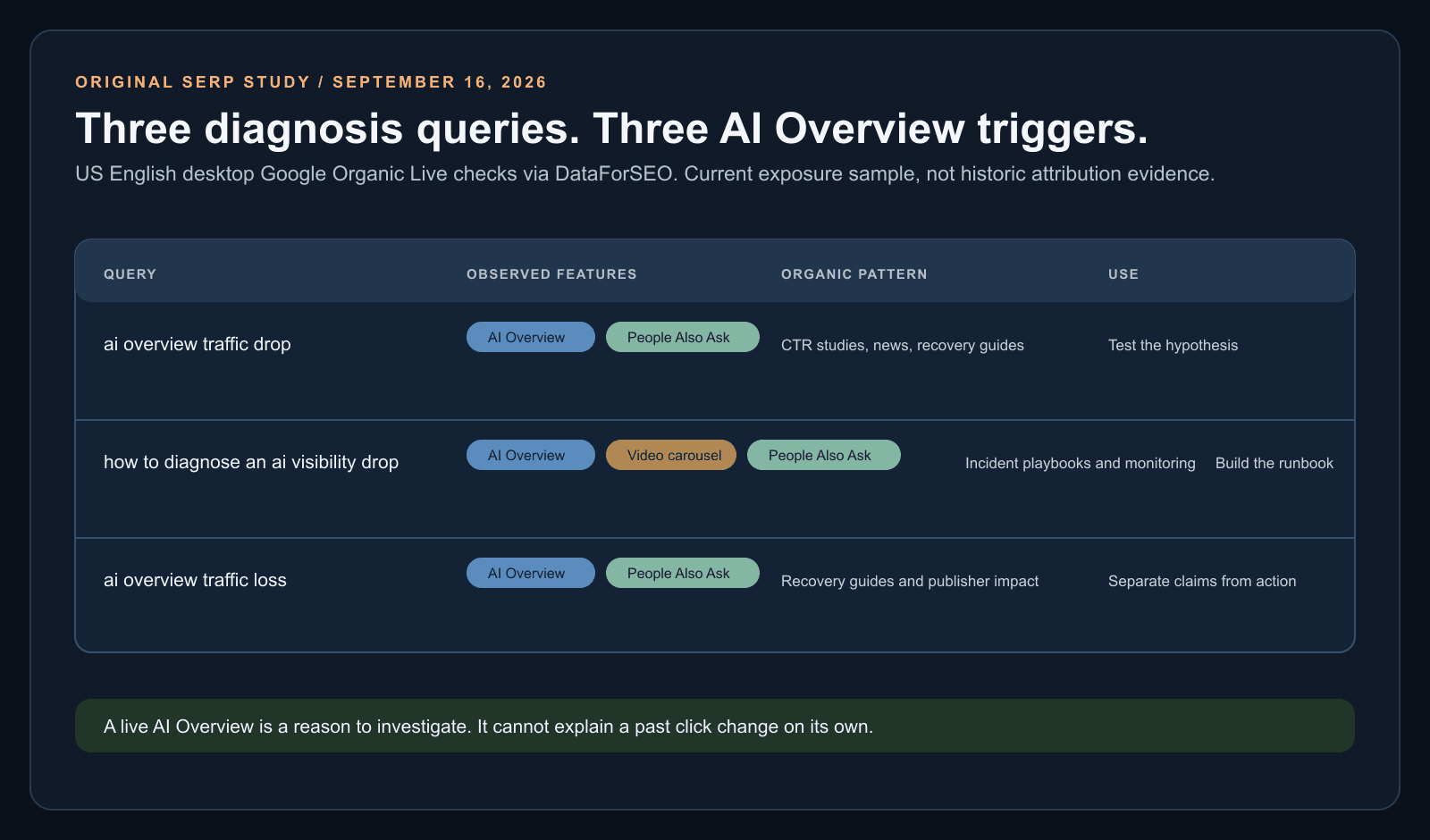
| Query | Observed features | Page-one pattern | What to do with it |
|---|---|---|---|
| ai overview traffic drop | AI Overview, People Also Ask | CTR impact studies, news, and recovery guides | Use for a click-loss hypothesis, then inspect your own data. |
| how to diagnose an ai visibility drop | AI Overview, video carousel, People Also Ask | Operational diagnosis and monitoring playbooks | Use for an incident workflow and alert design. |
| ai overview traffic loss | AI Overview, People Also Ask | Recovery guides, research, and publisher impact stories | Separate practical recovery choices from market-wide claims. |
Use a five-gate diagnosis before editing a page
A short incident path protects the team from changing content for the wrong reason.
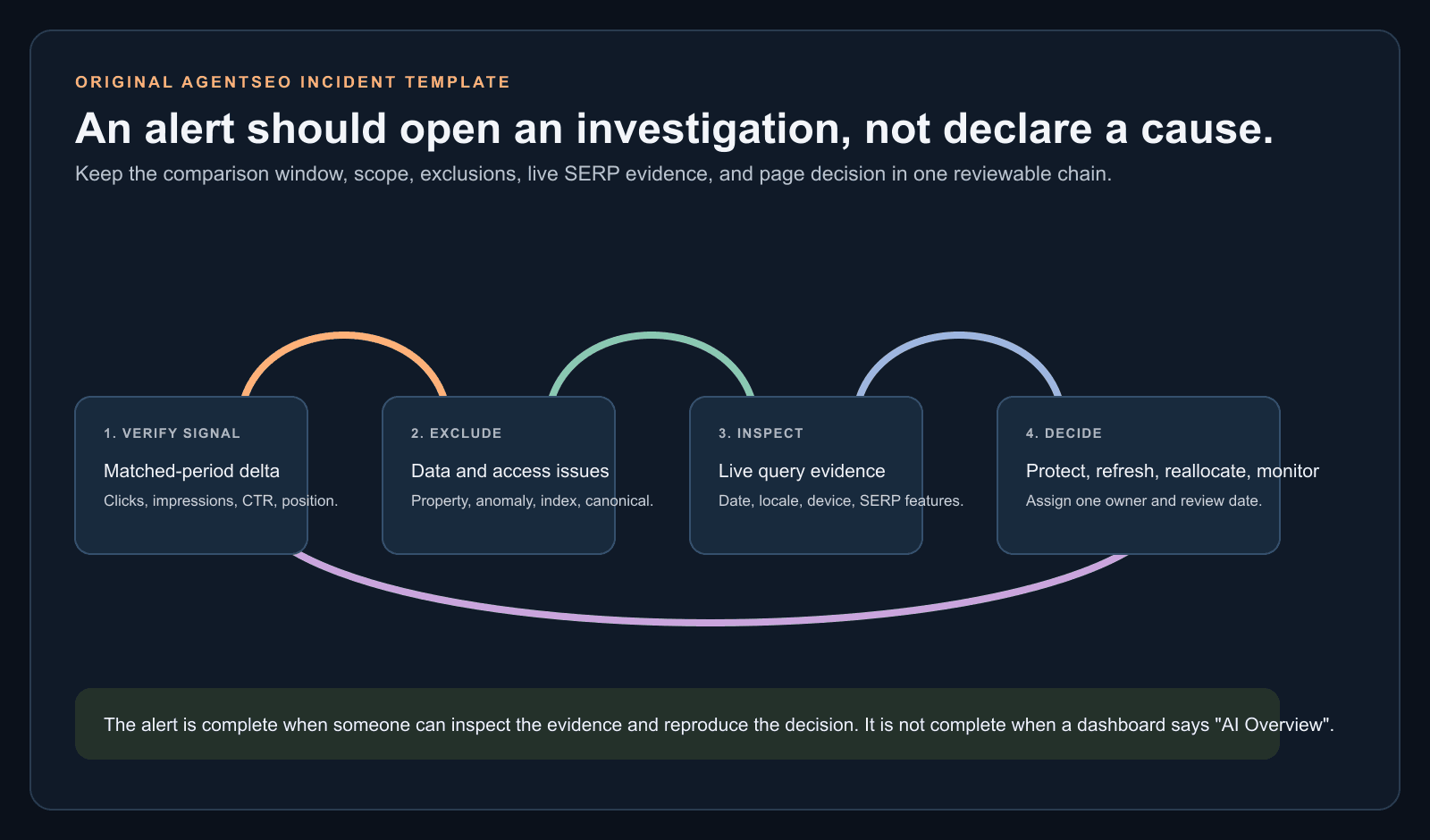
Start with the date of the change and compare it with an equal earlier period. Then move through the gates in order: data integrity, indexing and availability, demand and scope, ranking and SERP exposure, and finally the page's role and business value. Stop as soon as a stronger explanation appears.
Google announced dedicated generative-AI performance reports in Search Console in June 2026, with worldwide availability by August 31. Use them as a separate Google-side visibility layer where they are available. They do not supply a counterfactual click total, a complete citation path, or cross-platform answer evidence.
- Confirm the correct property, date window, comparison window, and known Search Console anomalies.
- Check index coverage, canonicals, robots directives, availability, manual actions, and security issues before content.
- Scope the loss by page, query, country, device, and search appearance. Sort by click difference, not anxiety.
- Separate demand change from a position change. Use Google Trends or comparable market evidence only after the page/query scope is clear.
- Run a live SERP check for the highest-impact query set and preserve the date, location, device, and feature result.
- Check whether the page is cited or absent only when the collection method captures those candidate sources. Do not infer citation from rank alone.
# AI Overview traffic-drop incident brief

## Scope
- affected page or page group:
- affected queries:
- comparison window and equal baseline window:
- country, device, and search type:

## Observed data
- click difference:
- impression difference:
- CTR difference:
- average-position difference:
- indexation, canonical, availability, manual-action, and security checks:
- known Search Console anomaly check:

## Live SERP evidence
- query, date, locale, device:
- AI Overview present: yes / no / inconclusive
- other material SERP features:
- target page ranked: yes / no / not checked
- target domain among captured candidate sources: yes / no / not captured

## Decision
- strongest supported explanation:
- unresolved alternatives:
- page action: protect / refresh / reallocate / monitor
- owner and review date:| Observed pattern | Plausible explanation | Next test before changing content |
|---|---|---|
| Impressions and position roughly stable; clicks or CTR down | Presentation change, snippet competition, AI Overview, or changing click choice | Check live SERP features and competing result treatment for the affected queries. |
| Impressions and clicks down; position slipped | Ranking loss, indexation, stronger competitors, or an update | Inspect page indexing, query-level position change, and current competing pages. |
| Impressions down; position roughly stable | Demand or query-mix change | Compare equivalent periods and market demand before editing the page. |
| One country, device, or page template falls | Localized targeting, rendering, template, or measurement issue | Segment the report, inspect representative URLs, and check recent deployments. |
| Generative-AI report dips during a known logging anomaly | Reporting artifact | Check Google's data-anomalies record and wait for corrected reporting before escalating. |
Choose protect, refresh, reallocate, or monitor
A confirmed exposure pattern does not produce one universal content action.
Protect a page when it still earns qualified visits, supports a commercial journey, or represents a core category even if broad informational clicks have compressed. Refresh it when the live SERP shows the page is still relevant but its answer, evidence, examples, or next step are weak. Reallocate when the query is fully satisfied on the results page and the page has no meaningful downstream role. Monitor when the evidence is thin or contradictory.
Do not delete a page merely because you suspect an AI Overview. A citation can be useful brand exposure, but do not assume it creates later branded demand or direct visits. Measure any downstream change separately and treat it as correlation unless you have a stronger design.
- Make the opening answer direct only when it genuinely improves the user's first decision.
- Add a calculation, template, comparison, primary source, or implementation detail the overview cannot replace.
- Update facts, examples, and the visible date only when there is a real material change.
- Improve the next step for readers who need more than the summary: a tool, workbook, detailed procedure, or commercial decision aid.
- Track citations, branded search, direct traffic, referrals, engagement, and conversion signals as separate outcomes with their own caveats.
| Decision | Use it when | Do next | Do not claim |
|---|---|---|---|
| Protect | The page still supports qualified visits, a core entity, or a useful downstream journey | Fix technical or experience friction; retain the asset and measure its role | That the page is safe from click compression |
| Refresh | The query and page remain relevant, but evidence or usefulness is weak | Add direct answers, primary sources, real examples, and a task-completing next step | That a refresh guarantees an AI Overview citation |
| Reallocate | The page is low-value, the intent is fully satisfied, and no downstream role remains | Stop expanding it; move effort to a distinct higher-value user job | That deletion creates a recovery |
| Monitor | The sample is too small or explanations conflict | Keep conditions stable, collect another comparable interval, and avoid radical edits | That no action means no risk |
Build alerts around a change you can verify
The useful alert is an investigation trigger, not a claim that AI search caused the problem.
The highest-impression query in this page's small visible export asks whether there is a way to get alerts when brand visibility in AI search suddenly drops. That is a real operator concern. The alert should not be 'AI Overview caused traffic loss.' It should be 'a comparable signal moved enough to investigate.'
Alert only when the change persists across a defined comparison window and the data is complete enough to review. Include the query or page scope, the metric delta, the matched baseline, the run conditions, and an owner. Then route to the five-gate diagnosis instead of jumping straight to content changes.
Related reading
How to prioritize content refreshes when answer engines absorb easy clicks
The refresh loop for AI Overview era traffic drops.
The full Google AI Mode guide
Broader context on how AI Mode and AI Overviews interact.
Google: debug drops in Search traffic
Use Google's primary troubleshooting order before assigning a cause to an AI feature.
Google: generative AI performance reports
Read the documented scope of the new Search Console generative-AI reporting layer.
{
  "alert_type": "search_click_change_requires_review",
  "scope": {
    "page": "[affected URL or page group]",
    "queries": ["[saved query set]"],
    "country": "[country]",
    "device": "[device]"
  },
  "comparison": {
    "current_window": "[start to end]",
    "baseline_window": "[equal earlier period]",
    "click_delta": "[value]",
    "impression_delta": "[value]",
    "position_delta": "[value]"
  },
  "verification": {
    "data_anomaly_checked": false,
    "indexing_checked": false,
    "live_serp_check": "not_run",
    "ai_overview_presence": "unknown"
  },
  "next_action": "run five-gate diagnosis",
  "owner": "[name or queue]"
}Keep the workflow moving
Turn an AI Overview suspicion into a reviewable diagnosis
Use AgentSEO to inspect a current query's AI Overview presence and candidate source set, then pair it with your own Search Console evidence before you change a page.

Daniel Martin
Cofounder, AgentSEO
Inc. 5000 Honoree and cofounder of AgentSEO and Joy Technologies. Daniel has helped 600+ B2B companies grow through search and now writes about practical SEO infrastructure for AI agents, MCP workflows, and REST-first execution systems.
FAQ
Questions teams usually ask next
How do I know if an AI Overview caused my traffic drop?
You usually cannot prove it from one signal. Compare matched Search Console periods, rule out indexing, demand, ranking, technical, and reporting causes, then capture live SERP evidence for the highest-impact queries. Stable impressions and position with lower clicks makes an AI Overview plausible, not certain.
Should I delete pages that lost clicks to AI Overviews?
No. First assess the page's role, qualified traffic, conversion path, and current SERP evidence. Protect or refresh a page that still has a valuable job. Reallocate effort only when the query is fully satisfied, the page has no downstream role, and the evidence supports that decision.
How long does it take to recover from an AI Overview traffic drop?
There is no reliable universal recovery window. Search recrawling, competitive changes, demand, and the query's remaining click need all vary. Record the change date, verify the rendered page, then review comparable Search Console data over the following weeks without treating a short-term change as proof of causation.
Does an AI Overview hurt every site in the same way?
No. The impact depends on the query, what the answer satisfies, the remaining need for a click, your position and snippet, the page's business role, and whether the site is represented among the sources. Do not apply a sitewide benchmark to one page without its own evidence.
Can Search Console attribute clicks to a specific AI Overview citation?
No. Search Console's generative-AI reports provide supported Google-side visibility dimensions. They do not give a complete citation trail or a direct counterfactual measure of clicks lost or earned because of a particular AI Overview.
More in this topic
AI visibility and AI search
Measurement
How to measure AI visibility: a practical tracker, audit, and reporting system
Measure AI visibility with a fixed prompt set, raw answer records, citation and mention metrics, and a reporting loop that sends each signal to a page decision.
Measurement
AI search reporting dashboard: what to track, what to show, and what to ignore
Build an AI search reporting dashboard that shows visibility, cited pages, competitors, business context, owners, and the next action. Includes a copyable prompt and template.